
Making a deposit at mFortune is a straightforward process for eligible players in the United Kingdom, but it pays to check the current payment options and bonus terms before sending money. This guide explains how to fund an account, what to consider when claiming a casino bonus, and how the mobile experience fits into the process. Promotions and payment methods can change, so the details shown in your account are the ones to rely on.
Before you deposit
mFortune is an online casino aimed at UK players. You must meet the operator’s age and eligibility requirements and complete any requested identity checks. In the UK, gambling is for people aged 18 or over. Only create an account if online gambling is legal for you and you are comfortable with the risks.
Decide on a spending limit before opening the cashier. A deposit is money transferred to your casino balance, not a guarantee of winning or a way to earn income. Consider using the site’s responsible-gambling tools, such as deposit limits or time-outs, if available. Never deposit money you need for bills or other essentials.
How to make a mFortune deposit
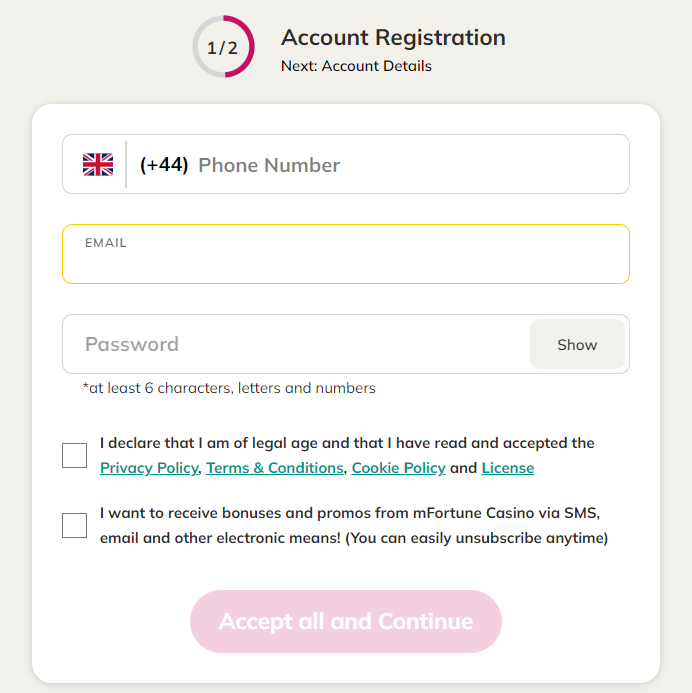
- Open the official site or app. Use mFortune’s official website or a verified app listing. Avoid links in unsolicited messages and check that you have reached the genuine service.
- Sign in or register. New customers will need to provide the information requested during registration. Enter accurate details, since mismatches may delay verification or withdrawals.
- Go to the cashier. Look for “Deposit”, “Cashier” or a similar option in your account menu.
- Choose a payment method. The available choices and any minimum or maximum deposit amounts are displayed in the cashier. Options may vary by account, device and time.
- Enter the amount. Check the amount carefully and make sure it fits your personal budget. If a bonus is offered, review its conditions before opting in.
- Confirm the transaction. Follow the payment provider’s instructions. You may need to authenticate the payment through your bank or wallet.
- Check your balance. Once the transaction is approved, confirm that the funds appear in your casino account. If they do not, keep the payment reference and contact official support rather than submitting repeated deposits.
Payment methods and common checks
Payment methods can include bank cards, online banking or electronic wallets, depending on what mFortune currently supports. The cashier is the best source for the live list. Before confirming, check whether the payment method is in your own name, whether your bank permits gambling transactions, and whether the provider charges any fees.
Deposits are often processed quickly, but timing can depend on the provider and any security checks. A pending transaction does not necessarily mean the casino has received the funds. Check your bank or wallet statement, then contact support with the date, amount and transaction reference if the balance remains unchanged.
Using a payment method belonging to someone else can create account and withdrawal problems. Keep your contact and payment details accurate, and complete any identity or payment verification requested through the official account area. Never send card details or identity documents in response to an unexpected message claiming to be from the casino.
Understanding the mFortune bonus
A casino bonus may add promotional funds or provide bonus spins, but each offer has specific rules. The headline amount alone does not show how easy it is to use or withdraw. Read the current promotion page and full terms before opting in, including eligibility, qualifying deposits, expiry dates, game restrictions and withdrawal limits.
Wagering requirements are especially important. They specify how many times a bonus, deposit, or combined amount must be played through before any associated winnings become eligible for withdrawal. The terms should also explain which games contribute and at what rates. A slot might contribute differently from a table game, while some games may be excluded altogether.
Do not assume a bonus is automatically applied to every deposit. Some promotions require you to select an offer or enter a code; others may have a separate opt-in step. If you prefer to play with cash funds only, check whether declining the promotion is possible before completing the deposit. Accepting an offer without understanding its conditions can affect how you play and when funds are withdrawable.
The phrase GB MFortuneBonus-UK App Download is useful to keep in mind when looking for information, but it should not replace checking the official mFortune site or a trusted app store. Search results and third-party bonus pages can be out of date. Confirm the offer directly with the operator before depositing for a promotion.
Using the app to deposit
On a mobile device, the cashier should follow much the same steps as on a desktop: sign in, open the deposit area, select a method, enter an amount and confirm. The exact layout may differ by operating system or app version. If you cannot find an option, try the official mobile website or contact support through a verified channel.
Install an app only from an official source and review its publisher before downloading. Keep your device’s operating system and security settings up to date, use a strong unique password, and avoid logging in on shared or public devices. An app can make account access convenient, but it does not change the risks of gambling or the terms attached to a bonus.
Questions and answers
Why has my deposit not appeared?
The payment provider may still be processing it, or an account check may be required. Check the payment status and account messages first. If the transaction is marked complete but the balance is unchanged, contact official support with the payment reference. Avoid making another deposit until you know what happened to the first one.
Can I deposit with a method that belongs to someone else?
You should use a payment method in your own name. Third-party payments can be rejected and may lead to verification or withdrawal complications. Follow the operator’s payment rules and ask support if you are unsure whether a particular method is accepted.
Can I withdraw a bonus immediately?
Usually, bonus funds and related winnings are subject to the promotion’s conditions. Check wagering requirements, game contribution rules, expiry dates and any maximum cash-out limits. The cashier or promotion terms should explain when funds become available for withdrawal.
What should I do if a payment is declined?
Check that the details are correct and that your bank or payment provider allows the transaction. Your provider may be able to explain a decline, but do not repeatedly retry if you are uncertain about the cause. You can choose another method listed in the cashier or ask mFortune support for guidance.
Deposit checklist
- Use the official mFortune website or a verified app.
- Confirm the deposit amount and payment method before authorising the transaction.
- Read the bonus terms before opting in, especially wagering and expiry rules.
- Keep payment records and contact support through official channels if something goes wrong.
- Set a budget and stop when you reach it.
A successful deposit is only the first step in using an online casino account. Check the cashier’s current instructions, protect your account details and make an informed choice about any promotion. If gambling stops being enjoyable or begins to affect your finances or wellbeing, take a break and use the available blocking and support services. In the UK, you can also seek confidential help from organisations such as GamCare.